NSD4 goes unresponsive with lots of TCP connection!

Hi,

We are seeing some large number of TCP connections to our DNS servers (in thousands) and NSD goes unresponsive after certain time and doesn't recover, it stops responding to UDP as well. We tried increasing the number of tcp-counts but it doesn't help.
I noticed the TCP backlog is hardcoded to 256 in NSD config, so even with customised TCP backlogs on the system its still being throttled at around 256. Is there anyway we can change this value without recompiling the NSD.

[kabindra@05 nsd-4.1.8]$ grep BACKLOG *
config.h.in:#undef TCP_BACKLOG
configure:#define TCP_BACKLOG 256
configure.ac:AC_DEFINE_UNQUOTED([TCP_BACKLOG], [256], [Define to the backlog to be used with listen.])

We are using NSD4.1.8.

( From one of the servers that went unresponsive, we have seen that TCP number closing to 10k. )

#ss -s
Total: 5591 (kernel 5640)
TCP: 5067 (estab 4968, closed 4, orphaned 0, synrecv 0, timewait 3/0), ports 28

Transport Total IP IPv6
* 5640 - -
RAW 0 0 0
UDP 122 63 59
TCP 5063 5017 46
INET 5185 5080 105
FRAG 0 0 0

Thanks.

Regards,
Kabindra Shrestha

Hi Kabindra,

I have not heard of this before, how is TCP affecting NSD? NSD has a
fixed number of tcp connections, configured in tcp-count: 100 from the
nsd.conf file. That should be what is services. You should increase
that count to increase responsiveness to TCP.

UDP should be unaffected.

The backlog is for tcp connections waiting to be accepted. 256 is
reasonably portable, reasonably large. I don't see how that value is
your problem. Is your kernel and networking subsystem failing?

The OS can return EMFILE or ENFILE to accept(), nsd starts to stop
accepting TCP connections to relieve buffer stress on the OS. But
again, UDP should not have been impacted?

Are you using so-reuseport: yes? I have had reports that it disrupts
connectivity (depending on OS, particular version of the OS, and more
recent versions of NSD do not use reuseport on TCP anymore).

Best regards, Wouter

Hi,

  I have seen opposite (same?) situation with BIND9 nameserver -- many
UDP queries and
almost unresponsible both for UDP and TCP query.
That was not due to BIND9's issue, but firewall (iptables) state table was full.

Hi,

We have seen the behaviour described in first message on two of our nodes:
NSD 4.0.1 and 4.0.3 went completely unresponsive when sockstat showed
few thousand TCP connections. Both nodes operate under FreeBSD 10.0.

Recently I updated NSD to 4.1.9 and now am waiting if problem appear again.

Hi Wouter,

Signed PGP part
Hi Kabindra,

I have not heard of this before, how is TCP affecting NSD?

After couple thousand of TCP queries, NSD goes unresponsive for both TCP and UDP.
[kabindra@1 ~]$ dig @hostname -p 5350 ch txt hostname.bind

; <<>> DiG 9.8.1 <<>> @ -p 5350 ch txt hostname.bind
; (2 servers found)
;; global options: +cmd
;; connection timed out; no servers could be reached
[kabindra@1 ~]$ dig @hostname -p 5350 ch txt hostname.bind +tcp

; <<>> DiG 9.8.1 <<>> @ -p 5350 ch txt hostname.bind +tcp
; (2 servers found)
;; global options: +cmd
;; connection timed out; no servers could be reached

One thing we noticed, we have set the server-count to 4, so it should have 4 child process forked, right? when NSD goes unresponsive, we see couple of process and more than 4 child processes.
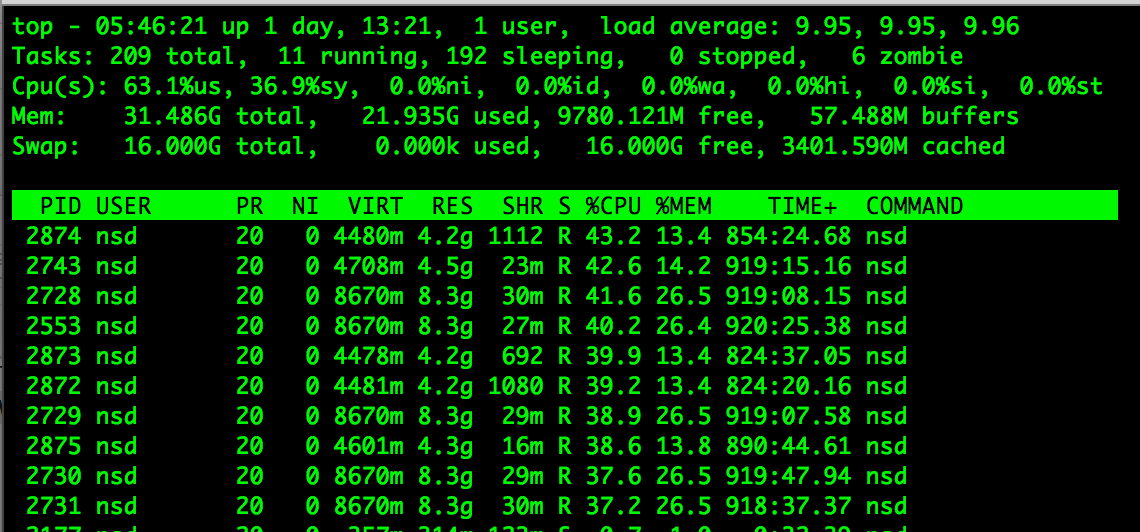
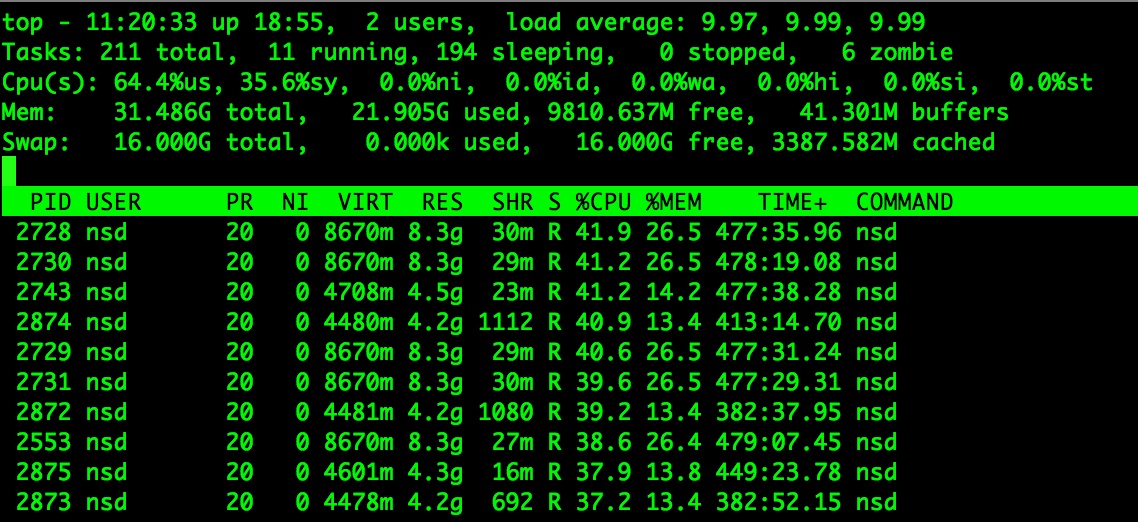
also, these NSD processes are using lots of CPU. I have left this box out of service for almost 2 days now after going unresponsive but you can see the cpu usage on the below image, it’s not coming down.

NSD has a
fixed number of tcp connections, configured in tcp-count: 100 from the
nsd.conf file. That should be what is services. You should increase
that count to increase responsiveness to TCP.

Yes, that’s what we changed earlier to increase responsiveness to TCP.

UDP should be unaffected.

That is not the case we are seeing.

The backlog is for tcp connections waiting to be accepted. 256 is
reasonably portable, reasonably large. I don’t see how that value is
your problem.

It has been so far and should be true for most of the users but recently with the increase in TCP traffic, I doubt that’s still the case. With the RRL implemented I believe it’s going to increase some amount of TCP traffic than what it used to be, right?

So say if I increase the number of tcp-counts to 1024 but my backlog is set to 256, will I still be able to get 1024 connections at a time or will I be limited to 256 connections concurrently?

Is your kernel and networking subsystem failing?

I don’t think so, if it was the problem I would see problem for other services on that server as well, right?

The OS can return EMFILE or ENFILE to accept(), nsd starts to stop
accepting TCP connections to relieve buffer stress on the OS. But
again, UDP should not have been impacted?

Again, that’s not the case we are seeing.

Are you using so-reuseport: yes?

Nope.

I have had reports that it disrupts
connectivity (depending on OS, particular version of the OS, and more
recent versions of NSD do not use reuseport on TCP anymore).

Sorry, forgot to mention earlier, we are on CentOS 6 and NSD 4.1.8.

Thanks.

Best regards, Wouter

Hi,

We are seeing some large number of TCP connections to our DNS
servers (in thousands) and NSD goes unresponsive after certain time
and doesn’t recover, it stops responding to UDP as well. We tried
increasing the number of tcp-counts but it doesn’t help. I noticed
the TCP backlog is hardcoded to 256 in NSD config, so even with
customised TCP backlogs on the system its still being throttled at
around 256. Is there anyway we can change this value without
recompiling the NSD.

[kabindra@05 nsd-4.1.8]$ grep BACKLOG * config.h.in:#undef
TCP_BACKLOG configure:#define TCP_BACKLOG 256
configure.ac:AC_DEFINE_UNQUOTED([TCP_BACKLOG], [256], [Define to
the backlog to be used with listen.])

We are using NSD4.1.8.

( From one of the servers that went unresponsive, we have seen that
TCP number closing to 10k. )

#ss -s Total: 5591 (kernel 5640) TCP: 5067 (estab 4968, closed 4,
orphaned 0, synrecv 0, timewait 3/0), ports 28

Transport Total IP IPv6 * 5640 - - RAW
0 0 0 UDP 122 63 59 TCP 5063
5017 46 INET 5185 5080 105 FRAG 0 0
0

Thanks.

Regards, Kabindra Shrestha

_______________________________________________ nsd-users mailing
list nsd-users@NLnetLabs.nl
https://open.nlnetlabs.nl/mailman/listinfo/nsd-users


nsd-users mailing list
nsd-users@NLnetLabs.nl
https://open.nlnetlabs.nl/mailman/listinfo/nsd-users

Regards,
Kabindra Shrestha
Hi,

Hi,

Hi,

We have seen the behaviour described in first message on two of our nodes:
NSD 4.0.1 and 4.0.3 went completely unresponsive when sockstat showed
few thousand TCP connections. Both nodes operate under FreeBSD 10.0.

Recently I updated NSD to 4.1.9 and now am waiting if problem appear again.

Was the RRL ratelimit too strict on the earlier version. The increment on the number of TCP connections on our end is mostly due to the strict ratelimit. But still NSD daemon going unresponsive for both UDP and TCP on TCP load is quite problematic.

Thanks

Hi,

I have seen opposite (same?) situation with BIND9 nameserver -- many
UDP queries and
almost unresponsible both for UDP and TCP query.
That was not due to BIND9's issue, but firewall (iptables) state table was full.
_______________________________________________
nsd-users mailing list
nsd-users@NLnetLabs.nl
https://open.nlnetlabs.nl/mailman/listinfo/nsd-users

--
Is there any problem Exterminatus cannot solve? I have not found one yet.

Regards,
Kabindra Shrestha

Hi Kabindra,

The processes that are running but unresponsive is weird, can you do a
stack trace for them, eg. with 'gcore', straight with gdb
/usr/local/sbin/nsd <pid> and then bt? And tell me the stack traces?
You can also take multiple stack traces of the same process by trying
again a short time later (to see what sort of loop they must be in)?

The backlog is the number of tcp connections waiting for accept().
The tcp-count is the number is tcp connections NSD services after it
accepted() them. You can easily set tcp-count higher than backlog,
some systems (older), have a backlog of only 16 or so, while tcp-count
is 1000 or more. And perhaps very high backlog is an issue (some sort
of regression failure for the network stack)? But CentOS 6 and
FreeBSD 10 are very different, it is more likely this is caused by NSD
then. Those stack traces could prove useful (if it gets very long,
send it to me off-list).

Best regards, Wouter