1. Code of Conduct
Our Code of Conduct sets out how we would like to interact with our community. The code applies both to NLnet Labs’ staff and to the members of our community. Please make sure you familiarize yourself with its contents.
2. Using Discourse primarily via e-mail
A registered user with this Discourse instance is required for all interactions.
You can sign up here.
Configure e-mail settings
You can access the email settings by:
- Navigating to your profile (via your user icon at the top right corner usually), and
- Selecting
Preferences, and - Selecting
Emails.
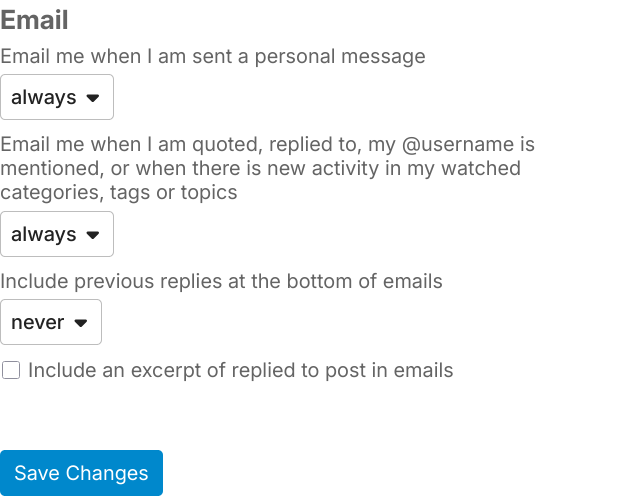
Make sure that the options match the image below and hit Save Changes when done:
Extra step:
Still in Preferences select Notifications and you may want to disable “Like” notifications like in the image below:

Don’t forget to click Save Changes when done!
Subscribing to a category
Categories are the equivalent individual mailing lists.
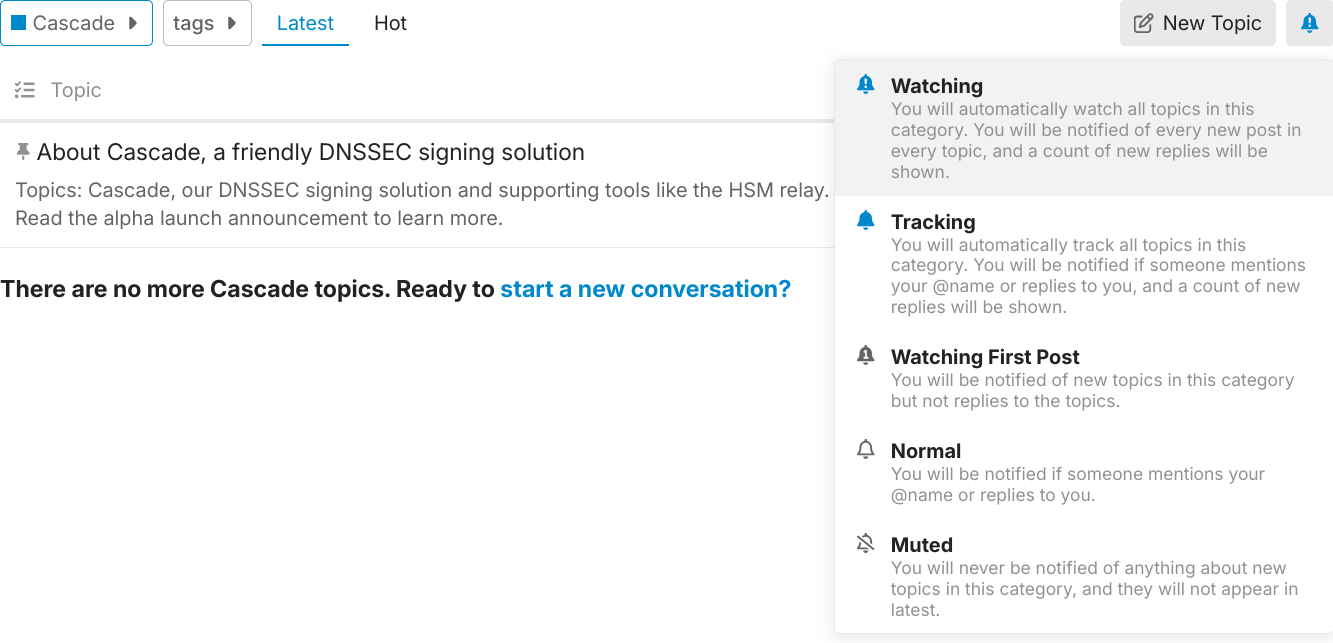
You can subscribe to a category by navigating to it, clicking the associated bell icon and selecting Watching like in the image below:
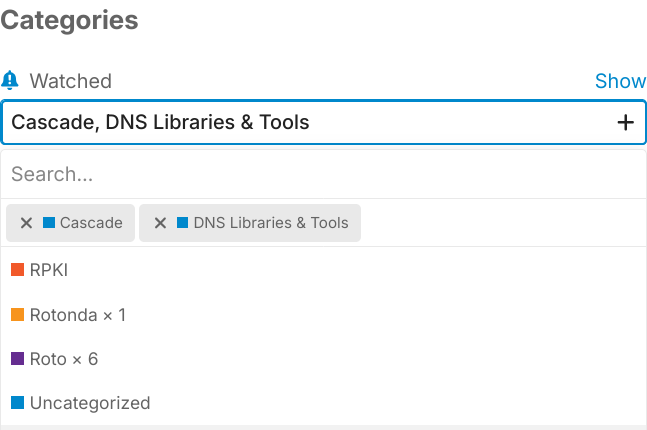
If you want to watch (subscribe) to more than one category, or manage your subscriptions, you can do it more conveniently by navigating to Tracking in Preferences.
Just make sure that you are adding categories to the Watched list like in the image below:
Don’t forget to click Save Changes when done!
Subscribing to a tag
The same procedure as “subscribing to a category” above can be followed.
The trivial way is again to navigate to Tracking in Preferences.
Just make sure that you are editing the “Tags” section.
And don’t forget to click Save Changes when done!
Creating a new topic
Topics are the equivalent of threads.
Each category has an associated e-mail alias.
The form of the alias is: <category-slug>@community.nlnetlabs.nl.
Sending e-mail to this alias starts a new topic. At the time of writing these are:
- unbound@community.nlnetlabs.nl
- nsd@community.nlnetlabs.nl
- cascade@community.nlnetlabs.nl
- dns-libraries-tools@community.nlnetlabs.nl
- roto@community.nlnetlabs.nl
- rotonda@community.nlnetlabs.nl
- rpki@community.nlnetlabs.nl
Replying to a post
You can just reply with a regular email back to the email notification.
List-IDs
Discourse attaches List-ID to e-mail notifications of the form:
<category-slug>.community.nlnetlabs.nl
3. RSS feeds
This instance supports RSS feeds.
The most common ones could be:
https://meta.discourse.org/latest.rssfor the latest topics.https://meta.discourse.org/tag/[tag_name].rssfor the latest topics with a specific tag, e.g.,https://meta.discourse.org/tag/release.rss.
You can find more information on available RSS feeds on Discourse instances at the official documentation.
4. Custom side bar filters
If you want to filter out the noise and focus on specific categories/topics/tags with one click, you can add such filters in a custom section on the sidebar.
First, click on More>Filter on the sidebar and create a filter with filter terms like tag:release category:nsd,unbound to track releases of NSD and Unbound for example, and press Enter. Copy the now updated URL from the browser’s URL bar.
Then, click on the “plus” icon at the bottom of the sidebar to “Add custom section”. Give the section a name and paste the URL as the Link attribute. Choose a name and a icon for this filter URL.
More filter URLs and/or custom section can be added as needed.
Now these provide quick navigation links to filtered results on the sidebar.